- Support Home
- Knowledge Base
- Target Expressions
- Using JSONPath in Target Expressions
Using JSONPath in Target Expressions
This KB shows how to target subscribers using structured JSON data stored in subscriber custom fields, partition custom fields, and any other JSON-backed fields.
What JSONPath targeting is
JSONPath targeting lets you create audience segments based on values stored inside structured JSON data. JSONPath targeting allows you to target subscribers based on individual values.
When to use it
This can be used with subscriber custom fields, partition custom fields, and other fields that store JSON data, enabling more granular segmentation based on complex or nested data structures.
Basic Syntax
Example Syntax 'cf:custom_field_name' @@ '$.json.path == "value"'
- Use @@ to match JSONPath.
- Use !@@ to exclude matches.
- Use quotes around custom field names, especially if they contain spaces, punctuation, or mixed case.
Working examples
In this example, subscribers are targeted based on the coupon code.
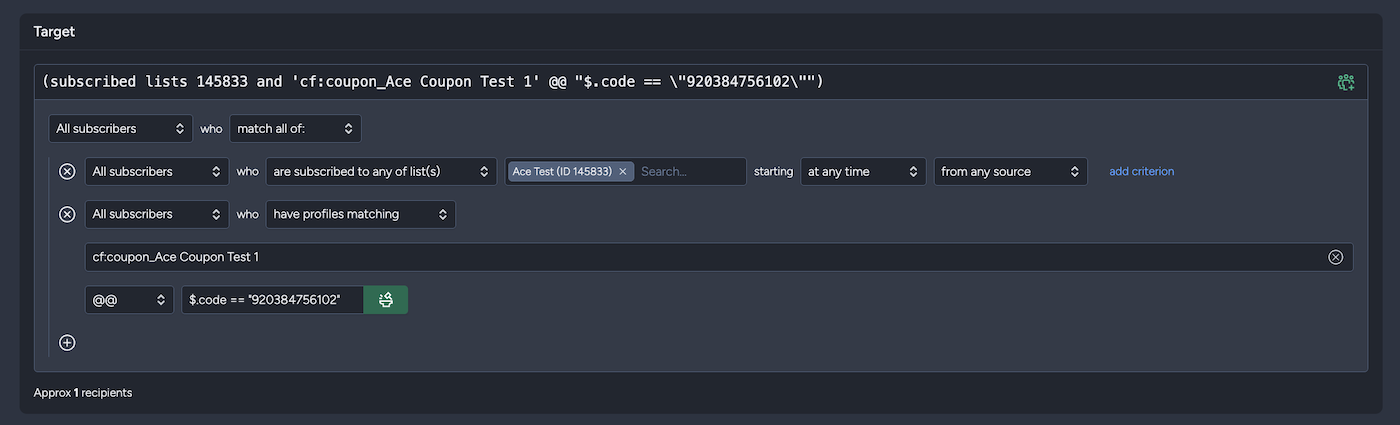
Target subscribers with a coupon expiring after a date/time:
'cf:coupon_Ace Coupon Test 1' @@ '$.expiryDate > "2026-10-01T00:00:00"'
Target subscribers where a coupon redemption flag is stored as a string:
'cf:coupon_Cool Discount Promotion' @@ '$.isredeemed == "false"'
Target subscribers with nested flight search data:
'cf:flight_search_tracker' @@ '$.deal.flightGroups[*].carrier == "JQ"'
Target subscribers where hotel upsell data contains a city:
'cf:hotel_upsell' @@ '$.input.city == "Sydney"'
Target subscribers where an array contains an object with a matching status:
'cf:ontheroad16_submitLog' @@ '$[*].status == "new"'
Target subscribers where voucher line items include a promotion ID:
'cf:VoucherLineItems' @@ '$[*].PromotionID == "DDS-000155"'
Target subscribers by a value inside practice details:
'cf:practiceDetails' @@ '$.practice_address_state == "QLD"'
Note that this is not jQuery. It is JSONPath-style querying in target expressions.
- true and "true" are different. Match the actual stored JSON type.
- Arrays can be queried with [*].
- Custom fields should usually be referenced as 'cf:field_name'.
- If the field contains invalid JSON, the expression will not match.
Arrays and nested objects
JSONPath targeting supports nested objects and arrays, allowing you to target subscribers based on values stored within complex JSON structures. You can reference specific properties in nested objects or match values contained in arrays, making it easy to segment audiences using structured data.
Boolean vs. string values
When targeting JSON data, make sure the value type matches the data stored in the field. Boolean values (true, false) are different from string values ("true", "false"), and queries must use the correct type to return expected results.
Limitations and troubleshooting
JSONPath targeting only works with valid JSON data. If a query doesn't return the expected results, verify that the JSON structure is valid, the path exists, and the value type in your query matches the stored data.
Related articles: Targeting based on purchase data How do I generate an extract of subscribers by activity check targeting?