- Support Home
- Knowledge Base
- Web Forms
- How to properly track 2-step unsubscribes
Related articles
Need some help?
If you have questions or can't find what you're looking for, we're here to help.
Taguchi Support is available 24 hours a day, Monday to Friday.
Create New TicketTaguchi Certified Training
Join our free and live online training sessions. You'll benefit from a better understanding of the platform's features and functionality. Plus with Taguchi Certified Rewards, every session you attend, you're not just learning - you're earning your way to some fantastic rewards.
About Taguchi Certified RewardsAPI Version 5
Did you know Taguchi has an API that supports all of the functionality provided by the admin interface and more?
Explore API Documentation
Thanks for your feedback!
How to properly track 2-step unsubscribes
Why setup a two-step unsubscribe process?
- Prevent accidental or malicious unsubscribes
- Gather feedback before losing the user
- Offer alternatives instead of full unsubscribe
Method 2: Using API V5 Endpoint (Unauthenticated)
This method uses an integration-based endpoint created via
Integrations → New Integration → API: V5 Endpoint (Unauthenticated).
It achieves the same output in the interaction history as Method 1 but uses JSON payload data instead of a form.
Example Payload
[
    {
        "profile": {
            "email": "test@example.com",
            "lists": [
                {
                    "listId": 1447,
                    "importId": null,
                    "campaignId": null,
                    "subscribedTimestamp": null,
                    "unsubscribedTimestamp": true,
                    "subscriptionOption": null
                }
            ]
        }
    },
    {
        "event": {
            "target": { "email": "test@example.com" },
            "isTest": false,
            "type": "up",
            "activityId": 5055,
            "parentId": 445764070457614336
        }
    },
    {
        "event": {
            "target": { "email": "test@example.com" },
            "isTest": false,
            "type": "u",
            "activityId": 5055,
            "parentId": 445764070457614336
        }
    }
]
Explanation of Key Fields
| Field | Description |
|---|---|
profile.email |
Identifies the subscriber to be updated. |
lists |
Defines which list(s) the subscriber is being unsubscribed from. |
unsubscribedTimestamp |
Set to true to mark the subscriber as unsubscribed. |
subscribedTimestamp |
Set to true if you want to re-subscribe the user instead. |
event.type |
Defines the event type:u = Unsubscribedup = Profile Update |
activityId |
The ID of the unsubscribe activity (webform) used. |
parentId |
Links the logged event to the campaign email the user came from. |
By including both update (up) and unsubscribe (u) events in the payload, Taguchi accurately reflects the subscriber’s opt-out action in their history.
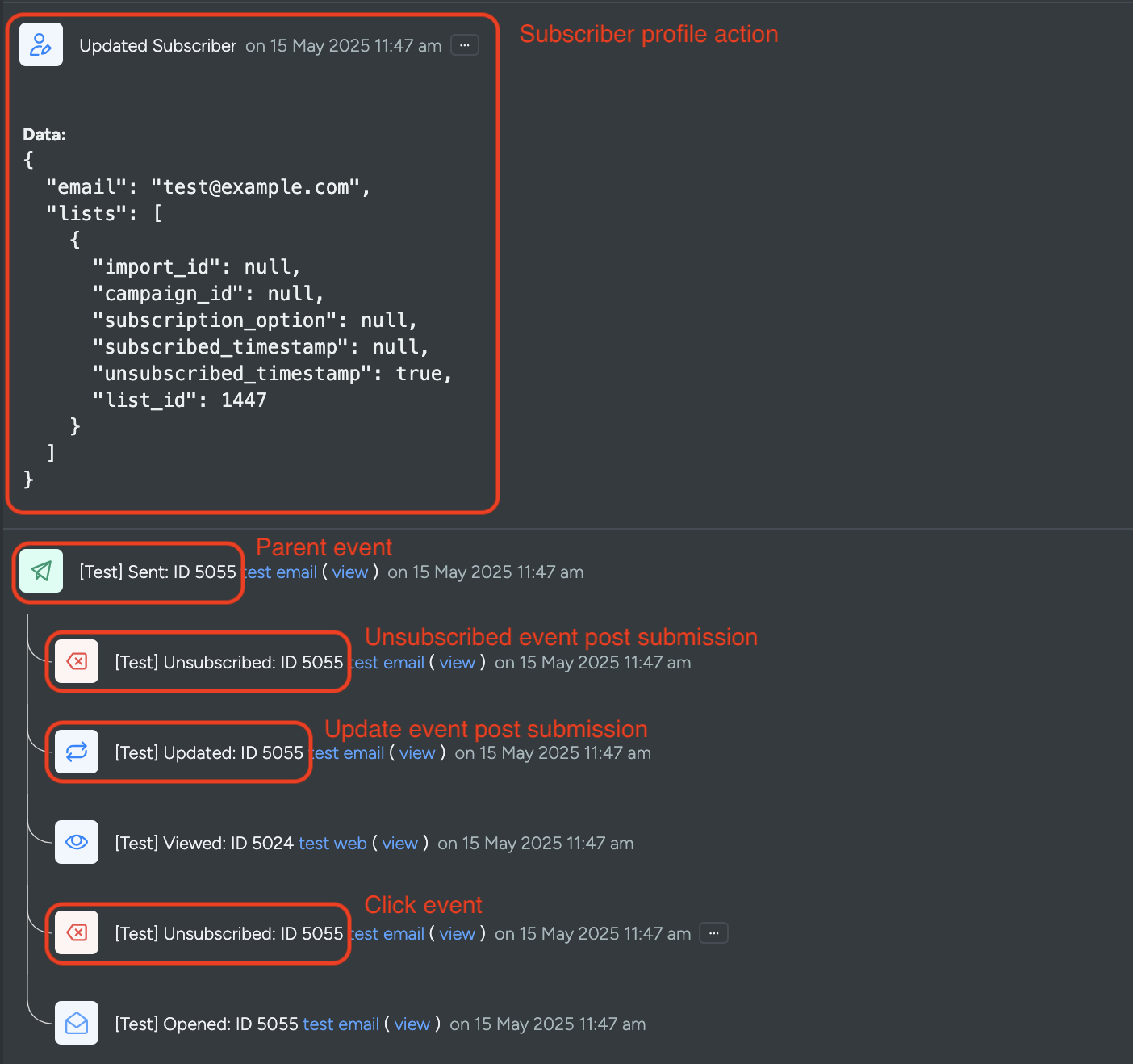
After submitting the payload, the subscriber’s interaction history will display both actions, as shown below:
Additional Notes
- Always include a valid
emailfield to identify the subscriber. - The
parentIdis essential for linking the unsubscribe action back to the originating campaign. - If the unsubscribe action is not appearing in the interaction history:
- Verify your
evtandtypevalues. - Confirm list IDs and payload field names are correct.
- Ensure your integration endpoint is active and accessible.
- Verify your
For detailed API specifications and additional examples, refer to the
V5 API Documentation.
For Method 1: Legacy Unsubscribes TrackingFor Method 1:
💬 For further assistance, contact Taguchi Support.