- Support Home
- Knowledge Base
- Campaigns And Activities
- Content Segmentation
- Using Exclusion Rules to Prevent Segment Overlap
Related articles
Need some help?
If you have questions or can't find what you're looking for, we're here to help.
Taguchi Support is available 24 hours a day, Monday to Friday.
Create New TicketTaguchi Certified Training
Join our free and live online training sessions. You'll benefit from a better understanding of the platform's features and functionality. Plus with Taguchi Certified Rewards, every session you attend, you're not just learning - you're earning your way to some fantastic rewards.
About Taguchi Certified RewardsAPI Version 5
Did you know Taguchi has an API that supports all of the functionality provided by the admin interface and more?
Explore API Documentation
Thanks for your feedback!
Using Exclusion Rules to Prevent Segment Overlap
Exclusion rules are used when you have one activity with multiple segments, but you want each subscriber to receive only one content variation.
This ensures that even if a subscriber matches more than one segment, they will only be included in the most relevant one based on your rule setup.
Common Use Cases
You may use exclusion rules when:
- A subscriber purchases multiple products, and each product has its own content variations
- A subscriber belongs to multiple audiences, but should only receive one message
- You want one type of content to take precedence over another
- You need to avoid sending conflicting or duplicate content to subscribers
When to Use Exclusion Rules
You should use exclusion rules when:
- You have one activity with multiple content variations
- Subscribers may qualify for more than one segment
- Each subscriber should only receive one variation
- You want to control which subscribers are included in each segment
Without exclusions, subscribers can match multiple segments, which can lead to overlapping audience results and unintended content delivery.
How it works
The following example shows how exclusion rules are used to ensure each subscriber is only included in one segment.
These are sample targeting expressions for demonstration purposes only.
Main Activity Target Expression
(purchased product one of "Fresh Bread, Chocolate Cookies, Iced Coffee" and subscribed lists XXXX)
This targets all subscribers in the selected list who purchased any of the products. It creates a broad pool of eligible customers before segmentation is applied.
Segment Target Expressions
Fresh Bread (Highest Priority)
(purchased product = "Fresh Bread")Chocolate Cookies
(purchased product = "Chocolate Cookies" and not purchased product = "Fresh Bread")Iced Coffee (Lowest Priority)
(purchased product = "Iced Coffee" and not purchased product = "Fresh Bread" and not purchased product = "Chocolate Cookies")
Each segment builds on the one before it by excluding subscribers who have already been included in a previous segment.
Why the Order Matters
The order of the segments is intentional in the example above.
It works because each segment excludes subscribers who have already been captured in a previous segment. This is what ensures each subscriber only appears in one segment.
Important: This is not automatic behaviour based on segment order. The exclusion rules are what create the separation between segments.
Why Exclusion Rules Matter
Using NOT conditions ensures that:
- Subscribers are removed from lower segments once they match a higher-priority condition
- Each subscriber only appears in one segment
- Segment overlap is prevented
- Content delivery is consistent and predictable
For example, if a subscriber purchased both Fresh Bread and Chocolate Cookies, they will be included in the Fresh Bread segment and excluded from the Chocolate Cookies segment.
Example Structure
| Priority | Segment Logic |
|---|---|
| 1 | Condition A |
| 2 | Condition B AND NOT A |
| 3 | Condition C AND NOT A AND NOT B |
This pattern can be extended to as many segments as needed.
Common Mistakes
1. Forgetting an Exclusion Rule
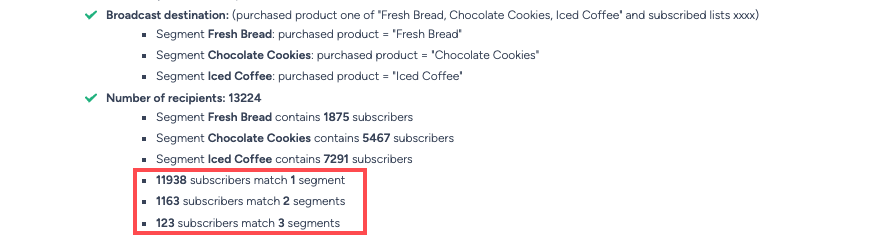
If you don’t exclude higher-level segments, subscribers may appear in multiple segments.
Incorrect setup:
- Segment 1: Condition A
- Segment 2: Condition B
- Segment 3: Condition C
This will result in overlapping segment matches.
2. Relying on Segment Order Alone
Taguchi does not automatically prioritise segments based on order.
You must explicitly define exclusions using NOT conditions to control which segment a subscriber belongs to.
3. Assuming Taguchi Auto Resolves Overlaps
Overlapping segments are not resolved automatically.
If exclusions are not used, subscribers can qualify for multiple segments.
How to Test Exclusion Rules
- Run an Activity Check
- Confirm each subscriber only appears in one segment
- Check for any overlap between segment results - no subscriber should appear in more than one segment
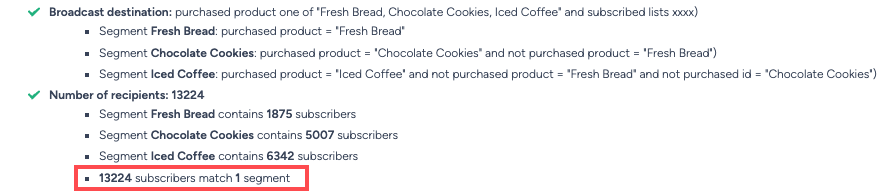
If you see overlapping results, review your exclusion rules and ensure NOT conditions have been applied correctly.
If you have additional questions or require further assistance, reach out to Taguchi Support