- Support Home
- Knowledge Base
- Subscriber Management
- Managing Subscriber Data
- Unique subscription enforcement (de-duplicated lists)
Related articles
Need some help?
If you have questions or can't find what you're looking for, we're here to help.
Taguchi Support is available 24 hours a day, Monday to Friday.
Create New TicketAPI Version 5
Did you know Taguchi has an API that supports all of the functionality provided by the admin interface and more?
Explore API Documentation
Thanks for your feedback!
Unique subscription enforcement (de-duplicated lists)
Unique subscription enforcement allows you to configure list-level rules that prevent multiple active profiles with identical email addresses or phone numbers from being subscribed to the same list. This ensures that when you send to a list, each unique email or phone receives only one copy of the message.
Overview
By default, Taguchi allows multiple profiles with the same email address or phone number to be subscribed to a list. This can happen when:
- The same customer creates multiple accounts with different external IDs
- Profile data is imported from multiple sources
- A customer updates their information but retains multiple historical records
With unique subscription enforcement, you can configure a list to automatically manage these duplicates by:
- Preventing new duplicate subscriptions when a profile is added to the list
- Cleaning up existing duplicates (optional) through daily batch enforcement
When to use unique subscription enforcement
Unique subscription enforcement is useful when:
- You want to ensure customers receive only one copy of each communication
- You're consolidating data from multiple sources that may contain duplicates
- You need to comply with communication preferences that specify "one message per customer"
- You're managing a master marketing list where duplicates should be automatically resolved
- You want to maintain clean, deduplicated subscriber lists for reporting accuracy
Configuration options
Unique subscription enforcement is configured at the list level in the List Setup interface.
How to configure
- Navigate to Lists in the main navigation
- Select the list you want to configure (or create a new list)
- Click on the List Setup section
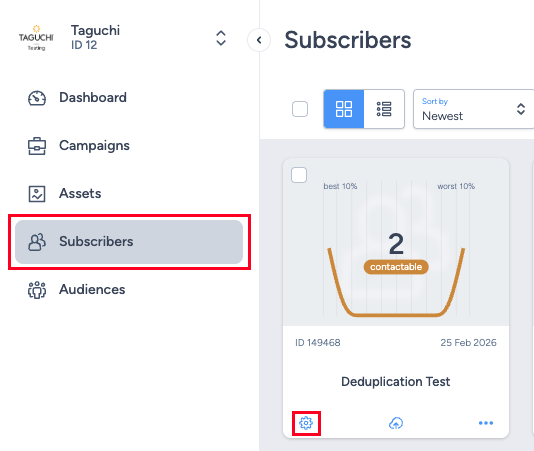
- Locate the Unique subscription enforcement dropdown
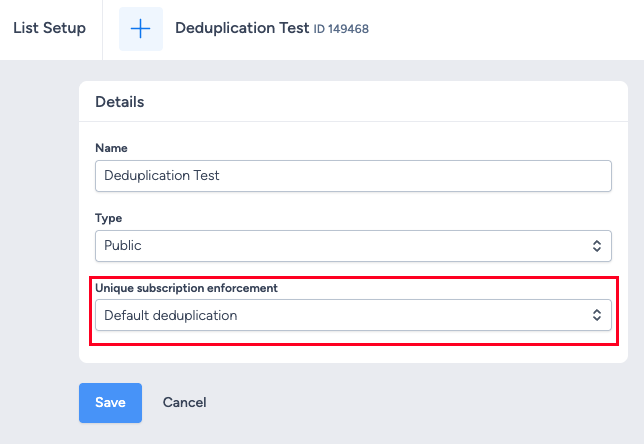
- Select your desired enforcement method:
- Default deduplication (no enforcement)
- Unique email addresses
- Unique phone numbers
- If you select email or phone enforcement, configure the additional fields that appear:
- Profile to keep subscribed: Choose "Keep oldest profile" or "Keep newest profile"
- Apply to existing profiles: Check this box to enable retroactive enforcement
- Click Save to apply the configuration
UI behavior
When "Default deduplication" is selected, only the enforcement dropdown is visible. When you select either "Unique email addresses" or "Unique phone numbers", two additional configuration fields appear below the dropdown:
- Profile to keep subscribed - Required field to choose which profile to retain when duplicates are found
- Apply to existing profiles - Optional checkbox to enable daily batch cleanup of existing duplicates
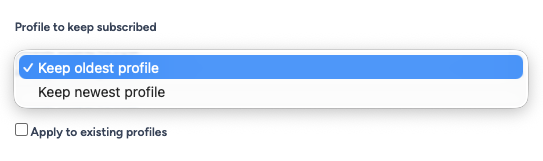
Note: This feature is available in the List Setup interface. The enforcement dropdown appears under the list Type field, and when email or phone enforcement is selected, the additional configuration fields appear immediately below.
Enforcement methods
Default deduplication (no enforcement)
This is the default behavior. No unique subscription enforcement is applied, and multiple profiles with the same email or phone can be subscribed to the list.
Unique email addresses
Only one active profile with a given email address can be subscribed to the list. Phone numbers are ignored for matching purposes.
- Matching: Profiles are matched based on email address only (case-insensitive)
- Null values: Profiles with null/empty email addresses are not considered duplicates
- Use case: When you primarily send emails and want to ensure one message per email address
Unique phone numbers
Only one active profile with a given phone number can be subscribed to the list. Email addresses are ignored for matching purposes.
- Matching: Profiles are matched based on phone number only
- Null values: Profiles with null/empty phone numbers are not considered duplicates
- Use case: When you primarily send SMS messages and want to ensure one message per phone number
Profile selection (which profile to keep subscribed)
When unique subscription enforcement is enabled, you must select which profile to keep when duplicates are found:
Keep oldest profile
Keeps the profile with the lowest subscriber ID (the profile that was created first in Taguchi) and unsubscribes all newer duplicate profiles.
- Use case: You want to maintain the original profile and its historical engagement data
- Behavior: When a new duplicate is added, it is prevented from subscribing or immediately unsubscribed
- Stability: The same profile consistently remains subscribed
Keep newest profile
Keeps the profile with the highest subscriber ID (the most recently created profile in Taguchi) and unsubscribes all older duplicate profiles.
- Use case: You want the most up-to-date profile information to be active
- Behavior: When a new duplicate is added, existing duplicate profiles are unsubscribed and the new one becomes the active subscription
- Data freshness: Ensures the active profile has the most recent data from your source systems
Apply to existing profiles
By default, unique subscription enforcement only affects new profiles added to the list after the rule is enabled. The "Apply to existing profiles" checkbox changes this behavior:
Disabled (default)
- Enforcement applies only to profiles added after the rule is configured
- Existing duplicate profiles already on the list remain subscribed
- Useful when you want to prevent future duplicates but not disrupt existing subscriptions
Enabled
- A daily batch process evaluates all active profiles on the list and resolves duplicates according to your configured rules
- Existing duplicate profiles are unsubscribed based on your "profile to keep" selection
- Useful for cleaning up historical duplicates or when implementing enforcement on an existing list with known duplicates
Note: When "Apply to existing profiles" is enabled, the daily enforcement task runs overnight. Changes to existing profiles will not be immediate.
How matching works
Email matching
When "Unique email addresses" is selected:
- Email addresses are matched case-insensitively (e.g., Test@Example.com matches test@example.com)
- Profiles with null or empty email addresses are not considered duplicates
- Phone numbers are ignored for matching purposes
Example:
Given these profiles:
- Profile A: email = customer@example.com, phone = null
- Profile B: email = customer@example.com, phone = +61400000000
- Profile C: email = different@example.com, phone = +61400000000
Result: Profiles A and B are considered duplicates (one will be unsubscribed). Profile C is kept as it has a different email.
Phone matching
When "Unique phone numbers" is selected:
- Phone numbers are matched exactly
- Profiles with null or empty phone numbers are not considered duplicates
- Email addresses are ignored for matching purposes
Example:
Given these profiles:
- Profile A: email = customer@example.com, phone = +61400000000
- Profile B: email = different@example.com, phone = +61400000000
- Profile C: email = customer@example.com, phone = +61400000001
Result: Profiles A and B are considered duplicates (one will be unsubscribed). Profile C is kept as it has a different phone number.
Null value behavior
Profiles with null/empty values in the matching field are never considered duplicates:
Example with email enforcement:
Given these profiles:
- Profile A: email = customer@example.com, phone = null
- Profile B: email = customer@example.com, phone = +61400000000
- Profile C: email = null, phone = +61400000000
- Profile D: email = null, phone = +61400000001
Result:
- Profiles A and B are duplicates (one will be unsubscribed)
- Profiles C and D are both kept (null emails are not considered duplicates)
Enforcement timing
Real-time enforcement (new profiles)
When a profile is added to a list with unique subscription enforcement enabled, the rule is applied immediately across all ingestion paths:
- API v2 list subscriptions
- UI bulk uploads
- Integration imports
- Web form submissions
- Subscriber management operations
The enforcement happens at the time of subscription, ensuring no duplicate active subscriptions are created.
Batch enforcement (existing profiles)
When "Apply to existing profiles" is enabled:
- A daily task runs overnight to enforce uniqueness rules
- All active subscriptions on the list are evaluated
- Duplicate profiles are unsubscribed according to your configured rules
- This ensures lists remain clean even if profile data changes after initial subscription
Important: If a profile's email or phone changes after being added to a list, it will not trigger enforcement unless "Apply to existing profiles" is enabled and the daily task runs.
Common use cases
Use case 1: Preventing duplicate email sends
Scenario: You have a newsletter list where customers may have multiple profiles due to different purchase channels, but each email should only receive one newsletter.
Configuration:
- Enforcement method: Unique email addresses
- Profile to keep: Keep oldest profile (maintain engagement history)
- Apply to existing profiles: Disabled (you'll clean this up separately)
Result: New subscriptions with duplicate emails are prevented. Existing duplicates remain until manually cleaned.
Use case 2: SMS campaign with phone deduplication
Scenario: You're running an SMS campaign and want to ensure each phone number receives only one message, regardless of how many profiles share that number.
Configuration:
- Enforcement method: Unique phone numbers
- Profile to keep: Keep newest profile (most current data)
- Apply to existing profiles: Enabled (clean up existing duplicates)
Result: Only one profile per phone number remains subscribed. The profile with the most recent data is kept.
Use case 3: Master marketing list cleanup
Scenario: You maintain a master marketing list that consolidates data from multiple sources. You want to ensure it's always deduplicated by email, keeping the most recently updated profile.
Configuration:
- Enforcement method: Unique email addresses
- Profile to keep: Keep newest profile
- Apply to existing profiles: Enabled
Result: The list is automatically deduplicated daily. When new profiles are added, older duplicates are unsubscribed and the newest profile becomes the active subscription.
Use case 4: Gradual deduplication (forward-only)
Scenario: You want to prevent future duplicates but need time to review and manually handle existing duplicates.
Configuration:
- Enforcement method: Unique email addresses
- Profile to keep: Keep oldest profile
- Apply to existing profiles: Disabled
Result: New duplicate subscriptions are prevented immediately. Existing duplicates remain subscribed, allowing you to review and handle them manually before enabling batch enforcement.
Important considerations
Backward compatibility
Lists without unique subscription enforcement enabled behave exactly as before:
- Multiple profiles with the same email or phone can be subscribed
- No automatic unsubscriptions occur
- Existing list behavior is unchanged
Profile changes after subscription
If a profile's email or phone number changes after being added to a list:
- Real-time enforcement does not apply (the profile is already subscribed)
- Batch enforcement will apply only if "Apply to existing profiles" is enabled
- The change is processed during the next daily batch run
Deterministic behavior
Enforcement rules are designed to be stable and predictable:
- The same configuration will always produce the same result for the same set of profiles
- Re-running enforcement does not cause profiles to be repeatedly unsubscribed and re-added
- Profile selection (oldest vs. newest) is based on subscriber ID, which is immutable
Performance considerations
- Real-time enforcement adds minimal overhead to subscription operations
- Batch enforcement runs daily during off-peak hours
- Large lists (millions of profiles) are processed efficiently using optimized database queries
Frequently asked questions
Q: Can I configure enforcement based on both email AND phone?
A: No. You must select one enforcement method: either email, phone, or none. If you need more complex deduplication logic, please contact Taguchi Support to discuss custom solutions.
Q: What happens to unsubscribed profiles?
A: When enforcement unsubscribes a duplicate profile, it performs a standard list unsubscription. The profile remains in the database but is no longer subscribed to that specific list. The profile can still be subscribed to other lists.
Q: Can I re-subscribe a profile that was unsubscribed due to enforcement?
A: Yes, but if the duplicate condition still exists, the profile will be unsubscribed again based on your enforcement rules. To keep a specific profile subscribed, you would need to either:
- Remove or update the duplicate profile to change its email/phone
- Disable unique subscription enforcement on the list
- Change the enforcement rules to favor that profile (e.g., switch from "oldest" to "newest")
Q: Does this affect global unsubscribes?
A: No. Unique subscription enforcement only manages list-level subscriptions. Global unsubscribe status is independent and is not affected by enforcement rules.
Q: What happens if I change enforcement rules after they're configured?
A: Changes to enforcement rules take effect immediately for new subscriptions. For existing profiles:
- If "Apply to existing profiles" is disabled: no changes occur to existing subscriptions
- If "Apply to existing profiles" is enabled: the new rules will be applied during the next daily batch run
Q: How do I know which profiles were unsubscribed by enforcement?
A: Profiles unsubscribed by enforcement are recorded in the standard list subscription history. You can view a profile's subscription history in the subscriber management section. The unsubscription will show as a list unsubscription.
Q: Does enforcement work with webforms?
A: Yes. Real-time enforcement is applied when profiles subscribe through webforms, just as it is for API subscriptions and bulk imports.
Related articles
- Import Logic via Taguchi UI
- What are list options?
- Does Taguchi automatically de-duplicate subscribers when importing to an already existing list?
- Why has a subscriber received multiple copies of the same email?
- What is the difference between global unsubscribe vs list unsubscribe?
Need help?
If you have questions about unique subscription enforcement or need assistance with configuration:
- Review the use cases and examples in this article
- Check the related articles for additional context
- Contact Taguchi Support for personalized assistance
Our support team can help you:
- Determine the best configuration for your use case
- Plan a migration strategy for existing lists
- Troubleshoot enforcement behavior
- Implement custom deduplication logic if needed