- Support Home
- Knowledge Base
- Campaigns And Activities
- Content
- Tagging in Taguchi
Tagging in Taguchi
Overview
You can now add tags to the following record types, in addition to the existing tagging support for content block assets:
- Activities
- Campaigns
- Lists
- Audiences
- Integrations
- Custom Fields
- Coupon Types
- Templates → Activity Themes
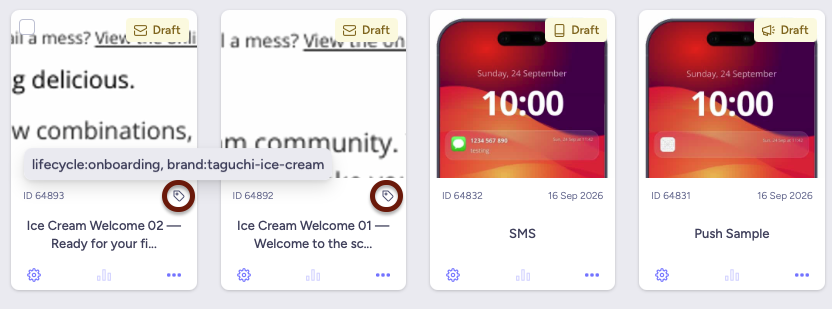
Tags are short, free-text labels you create and assign to help organize, categorize, and quickly find records. You can also filter list pages by tag to narrow down large sets of records.
Note: Tagging depends on backend support for the relevant record type being enabled in your environment. If you don't see a Tags field on a setup screen described below, contact Taguchi Support.
Adding tags to a record
- Open the setup screen for the item you want to tag, such as an Activity, Campaign, or List.
- Locate the Tags field.
- Start typing to:
- See a list of existing tags matching your text, or
- Create a brand-new tag by typing a name that doesn't already exist and selecting the "create" option.
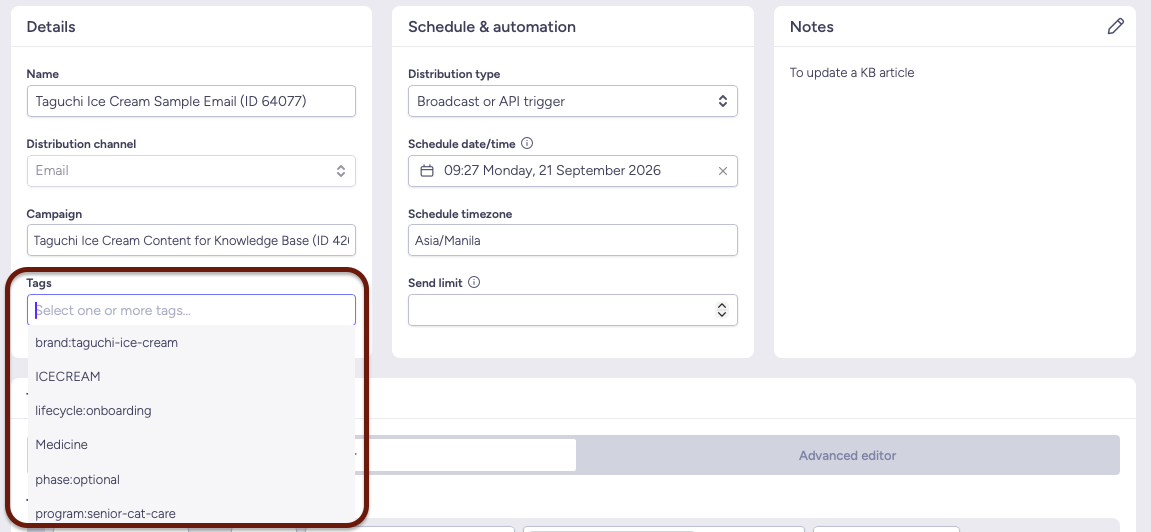
- Selected tags appear as tokens (chips) in the field. Add as many tags as you like.
- Remove a tag by clicking its remove icon.
- Save the record as usual for the tags to take effect.
Filtering records by tag
The following list/search pages now support a Tag filter:
- Dashboard (Activities)
- Campaigns
- Audiences
- Subscribers (Lists)
- Settings → Integrations
- Settings → Coupons
- Settings → Custom Fields
To filter by tag:
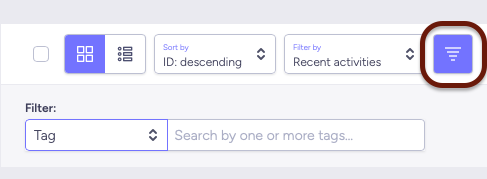
- Open the search/filter bar on the page.
- Choose Tag as the filter attribute.
- The search box switches to a tag-token input. Type or select one or more tags.
- Each tag you add appears as its own filter chip.
- Results are filtered to show only records matching all applied tag filters (i.e., tags are combined with AND logic — a record must have every selected tag to appear).
- Remove a tag filter chip to widen your results again.
Example use cases
- Group campaigns by brand, region, or initiative (e.g.
q4-promo,brand-a). - Flag records for internal review or cleanup (e.g.
draft,archive-candidate). - Tag integrations or coupon types by environment (e.g.
sandbox,production). - Quickly locate all custom fields related to a specific feature or integration.
- Filter a long list of audiences or lists down to just the ones relevant to a current project.
Tagging Recommendations
Since tags are plain strings, adopt a prefix-based naming convention to keep them organized and filterable, since without one, tags can become inconsistent across an org (e.g. Newsletter vs newsletter vs news-letter).
1. Core programme and content tags
| Namespace | Initial controlled values | Application |
|---|---|---|
program: |
product-focus, product-release, onboarding, adoption, training, new-business, support, events, preference-management, partner-marketing, demo |
The enduring programme or body of work. Normally one per object. |
objective: |
acquisition, nurture, conversion, onboarding, adoption, education, engagement, retention, reactivation, feedback, service, compliance |
The primary intended outcome. Normally one value. |
relationship: |
prospect, lead, client, partner, vendor, staff, mixed |
The recipient's relationship to Taguchi. Multiple values only when genuinely necessary. |
lifecycle: |
awareness, consideration, onboarding, activation, adoption, retention, reactivation, advocacy |
The customer or user lifecycle stage. |
topic: |
product-features, ai-assistants, targeting, personalisation |
Content subject. This may be multi-valued. |
channel: |
mail, sms, whatsapp, line, web, display-ad, paid-social, form, multi |
Most useful on campaigns and assets. On activities, use the native activity type unless cross-resource search requires a channel tag. |
market: |
global, apac, au, nz, sg, ph |
Geographic applicability. Avoid city tags unless location materially affects content. |
owner: |
marketing, product, support, security, data, operations |
The accountable team, not an individual employee. |
env: |
production, internal, demo, test |
Separates genuine production resources from demonstrations and testing. Every object should have one. |
2. List and consent tags
| Namespace | Initial controlled values | Application |
|---|---|---|
list-purpose: |
consent-master, preference, lead-capture, crm-master, event-registration, attendee, post-event, suppression, seed |
The business purpose of a standard list. |
subscription: |
industry-updates, event-invitations, newsletter, marketing |
The subscription or preference topic represented by the list. |
source: |
website, web-form, crm, event, import, api, integration, paid-social, manual |
Where the data or membership originates. This namespace is also useful for custom fields. |
consent-model: |
explicit, double-opt-in, operational, unknown |
Describes how membership or permission is obtained. It should describe the list’s operating model, not an individual subscriber’s current state. |
Do not duplicate the native listType for proof, approval and notification lists unless a unified cross-resource search requirement justifies it. Native list type should remain authoritative.
3. Audience tags
| Namespace | Initial controlled values | Application |
|---|---|---|
audience-basis: |
account , relationship, geography, engagement, product-usage, beta-access , consent , lifecycle, list-membership |
The business purpose of a standard list. |
Avoid tagging audience size, refresh status or current engagement counts. These are transient values and should come from audience statistics.
4. Asset tags
For assets, these tags should be implemented as controlled asset-tag clusters, with both a human description and a model description.
| Namespace | Initial controlled values | Application |
|---|---|---|
asset-role: |
header, footer, logo, hero, article, cta, icon, status-icon, screenshot, form-component, certificate, background |
The functional role of the asset. |
brand: |
taguchi, partner, demo, plus approved brand names |
The brand whose visual system the asset belongs to. |
reuse: |
evergreen, reusable, campaign-specific, event-specific, one-off |
Expected reuse and scope. |
variant: |
black, white, light, dark, desktop, mobile |
A meaningful visual or device variant. Do not create tags for arbitrary colours unless users regularly search by them. |
rights: |
owned, partner-supplied, licensed, external |
Ownership or usage-rights classification. |
governance: |
do-not-edit, review-duplicate, archive-candidate, retention-policy-required |
Exceptional handling or review requirements. Applicable to other object types as well. |
5. Custom-field tags
The native field type, group, provisional state and calculation schema should not be duplicated in tags. Tags should add business lineage and governance that those properties do not express.
| Namespace | Initial controlled values | Application |
|---|---|---|
data-domain: |
identity, contact, organisation, relationship, consent, preference, engagement, event, training, onboarding, product-usage, telemetry, integration |
The business meaning of the field. |
field-purpose: |
personalisation, segmentation, reporting, consent, onboarding, survey, integration, model-input, model-output, operational |
Why the field exists. Multiple values are acceptable where necessary. |
authority: |
system-of-record, user-entered, imported, derived, accumulator, legacy |
How the value is generated and how authoritative it is. |
sensitivity: |
public, internal, direct-pii, indirect-pii, sensitive-free-text, restricted |
Data-handling classification. |
retention: |
persistent, rolling, event-limited, annual, unknown |
Expected retention category. These values should ultimately align with Taguchi’s approved data-retention policy. |
Minimum profile by resource type
| Resource | Required tags | Common optional tags |
|---|---|---|
| Campaign | program:, objective:, relationship:, lifecycle:, cadence:, env: |
owner:, market:, account:, channel:, topic: |
| Activity | program:, objective:, format:, env: |
topic:, lifecycle:, relationship:, account: |
| List | list-purpose:, source:, relationship:, env: |
subscription:, consent-model:, program:, account:, market: |
| Asset | asset-role:; either program: or topic:; brand:, reuse:, env: |
channel:, variant:, rights:, depicts-status:, governance: |
| Audience | audience-basis:, program:, env: |
relationship:, account:, market:, usage-tier:, eligibility:, lifecycle: |
| Custom field | data-domain:, field-purpose:, source:, authority:, sensitivity:, owner: |
retention:, governance:, program: |
Activities should normally rely on native activity type and status rather than duplicating those values as tags. Similarly, assets should rely on native published, archived and expiry properties rather than tags such as asset-status:published.
Naming conventions to enforce
- Lowercase, hyphenated, no spaces (e.g.
q4-promo, notQ4 Promo) so literal matching does not fragment taxonomy. - Prefix:value pattern (
category:value) for filterable groupings; this structure is a convention for consistency, not a platform-enforced schema. - Keep a shared approved-tags list internally since tags can be created ad hoc from setup modals, which otherwise increases typo/duplicate risk (
newslettervsnews-letter).
Limitations
- Tags cannot currently be used inside targeting/segmentation expressions (i.e., you can't yet target subscribers based on "campaigns tagged X"). This is planned for a future release.
- Tagging on content block assets is unchanged — this update only extends the same tagging experience to the additional record types listed above.