- Support Home
- Knowledge Base
- Subscriber Management
- Handling Unsubscribes
- Unsubscribe Tracking Code for Two-Step Unsubscribe Pages
Unsubscribe Tracking Code for Two-Step Unsubscribe Pages
Improving Unsubscribe Tracking Accuracy in Taguchi eDMs
The {unsubscribe:track} parameter may be appended to unsubscribe URLs in eDMs sent through Taguchi Marketing. When this parameter is present, clicking the unsubscribe link immediately records an unsubscribe event in the subscriber’s interaction history.
This behaviour may produce inaccurate results when the client uses a two-step unsubscribe process. For example, a subscriber might open the unsubscribe page but leave before selecting the final Submit or Confirm unsubscribe button. The initial click may still be recorded as an unsubscribe even though the subscriber did not complete the process.
Tracking Completed Unsubscribe Events
To record only completed unsubscribe events:
- Decide which action confirms the unsubscribe, such as a successful submission of the final unsubscribe form.
- Preserve the subscriber and source-event tracking parameters throughout every step of the process.
- Update the subscriber’s subscription status and log the unsubscribe event only after the confirmation action succeeds.
- Send the required profile update and tracking information to Taguchi through an appropriate API endpoint.
Important: Remove
{unsubscribe:track}only after custom unsubscribe tracking has been implemented and tested. Removing it without a replacement may create gaps in unsubscribe reporting.
The implementation must be completed in the client’s website or preference-centre code.
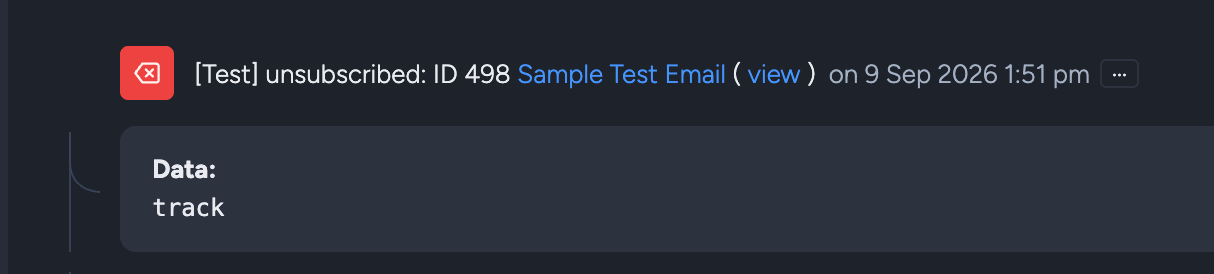
This is how the {unsubscribe:track} is logged on the subscriber's interaction history if you want to check it in the UI.
Example: Persisting the Tracking Parameters
Personalised Taguchi web links can include tracking parameters such as e, which identifies the subscriber, and sevt, which identifies the originating event.
For example:
https://www.example.com/preferences/unsubscribe?e=<subscriber-token>&sevt=<parent-event-id>
When the first unsubscribe page loads, copy these values into hidden fields so they are submitted with the confirmation form:
<form action="/preferences/unsubscribe/confirm" method="post">
  <input type="hidden" name="e" value="{{ query.e }}">
  <input type="hidden" name="sevt" value="{{ query.sevt }}">

  <button type="submit">Confirm unsubscribe</button>
</form>
The syntax used to read the query parameters will depend on the client’s application. Tracking values should be validated, safely encoded and retained until the final form submission.
The sevt value should be passed to Taguchi as the parent event so that the unsubscribe can be attributed to the originating email or campaign.
Example: Updating the Subscriber and Logging the Event
After the subscriber confirms the request, submit a POST request to the V5 API endpoint generated for the integration.
On the server, use the submitted e value to resolve and verify the subscriber identity (for example, to the endpoint’s configured email, id, ref, or phone identifier). Then build the API payload from that verified identifier.
The following example unsubscribes the subscriber from a specific list and records both the profile update and unsubscribe events:
POST <V5-ENDPOINT-URL>
Content-Type: application/json
[
  {
    "profile": {
      "email": "<verified-subscriber-email>",
      "lists": [
        {
          "listId": 1447,
          "importId": null,
          "campaignId": null,
          "subscribedTimestamp": null,
          "unsubscribedTimestamp": true,
          "subscriptionOption": null
        }
      ]
    }
  },
  {
    "event": {
      "target": {
        "email": "<verified-subscriber-email>"
      },
      "isTest": false,
      "type": "up",
      "activityId": 5055,
      "parentId": 445764070457614336
    }
  },
  {
    "event": {
      "target": {
        "email": "<verified-subscriber-email>"
      },
      "isTest": false,
      "type": "u",
      "activityId": 5055,
      "parentId": 445764070457614336
    }
  }
]
Replace the example values with:
- The subscriber identifier accepted by the configured endpoint
- The list from which the subscriber is opting out
- The ID of the unsubscribe web activity
- The parent event ID persisted from the original email link
In this example, up records the profile update and u records the completed unsubscribe. The API request should be sent only after the final confirmation action has succeeded.
This payload demonstrates a list-level unsubscribe. A global unsubscribe may require a different profile update based on the client’s endpoint configuration and unsubscribe requirements.
Testing the Implementation
Before removing {unsubscribe:track}, verify that:
- Opening the unsubscribe page without confirming does not record a completed unsubscribe.
- The tracking parameters remain available through every step.
- Selecting the confirmation button updates the correct subscriber and list.
- The subscriber’s interaction history contains the expected update and unsubscribe events.
- The unsubscribe event is linked to the originating email through the parent event ID.
- Repeated submissions are handled safely and do not create unintended results.
For more information, see How to properly track two-step unsubscribes, the V5 API documentation, and Handling unsubscribes.