- Support Home
- Knowledge Base
- Subscriber Management
- Importing Subscribers
- Mapping partition external ID during subscriber import
Related articles
Need some help?
If you have questions or can't find what you're looking for, we're here to help.
Taguchi Support is available 24 hours a day, Monday to Friday.
Create New TicketAPI Version 5
Did you know Taguchi has an API that supports all of the functionality provided by the admin interface and more?
Explore API Documentation
Thanks for your feedback!
Mapping partition external ID during subscriber import
If your organisation uses partitions to group subscribers by store, region or another business area, you can assign those partitions while importing a subscriber spreadsheet.
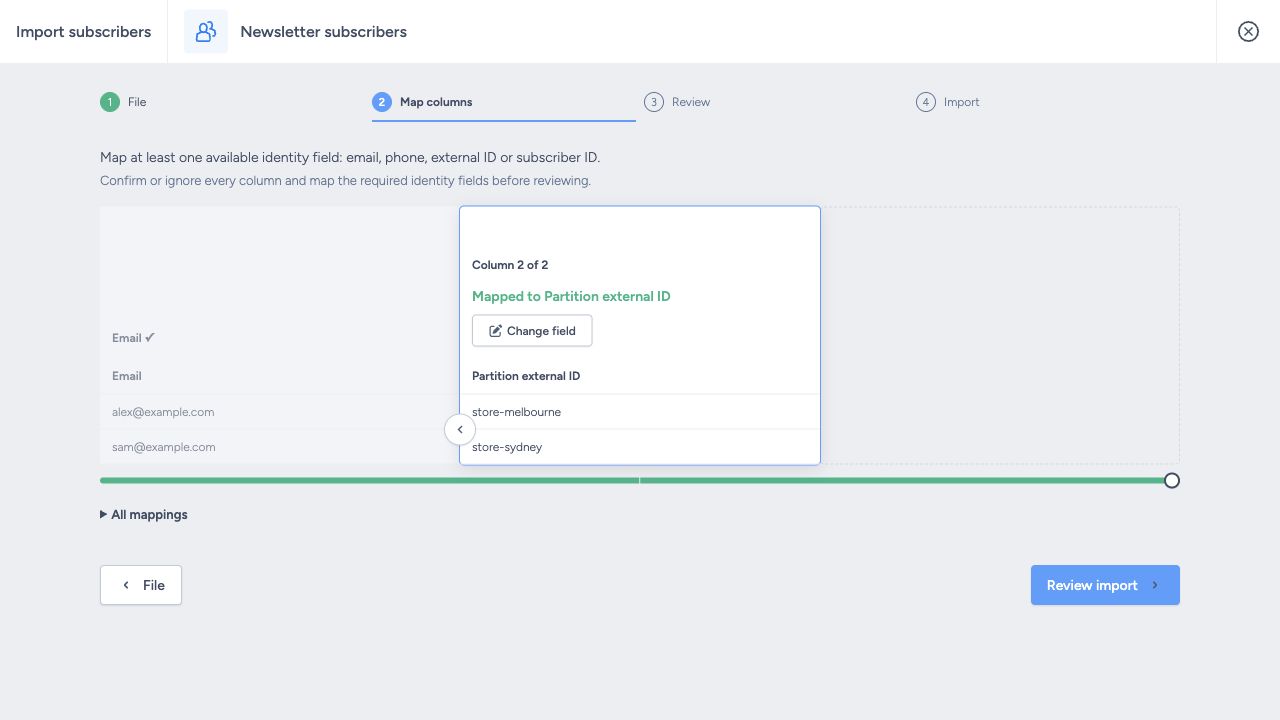
Include a column containing the partition external IDs and map it to Partition external ID (partition_ref). An external ID is the reference recorded for a partition in Settings, such as store-melbourne; it may differ from the partition's display name.
Before importing: this field replaces existing partition membership. A mapped blank cell, or a value containing only unknown partition references, clears the subscriber's existing assignments. Ignore or omit the column if you want existing membership left unchanged.
Prepare the file
Prepare the partition references before uploading:
- Open Partitions settings and check the external IDs you want to assign.
- Confirm that those partitions already exist in your organisation. Importing a reference does not create a partition.
- For multiple partitions, put each reference on a separate line within the same spreadsheet cell.
- If you save as CSV, enclose that multiline cell in quotation marks, as shown below.
Email,First name,Partition external ID
alex@example.com,Alex,store-melbourne
sam@example.com,Sam,"store-sydney
online"
taylor@example.com,Taylor,
This example makes the following changes, assuming all three partition references exist:
- Alex belongs only to
store-melbourneafter the import. Any other existing assignments are removed. - Sam belongs to
store-sydneyandonline. The line break keeps both references in one spreadsheet cell. - Taylor has no partition assignments after the import because the mapped cell is blank.
If Taylor's existing assignments should be kept, leave Taylor out of this partition-update file. Ignoring the partition column would preserve membership for every row, including Alex and Sam.
Map and review
- Open the import for the destination subscriber list and choose your file.
- On File, check the preview and heading settings, then click Map columns.
- Confirm an available subscriber identifier, such as Email.
- Go to the partition column, choose Partition external ID, then click Accept. Use Change field if you need to edit a confirmed mapping.
- Confirm or explicitly ignore every other column.
- Click Review import and check the destination, mappings and reported issues.
- Click Start import when ready.
How existing membership changes
| Source mapping/value | Result |
|---|---|
| Column omitted or explicitly ignored | Existing partition assignments are preserved. |
| One valid external ID | Existing assignments are replaced with that partition. |
| Multiple valid IDs, separated by line breaks | Existing assignments are replaced with that set of partitions. |
| Mapped blank cell | Existing assignments are cleared. |
| Valid and unknown IDs mixed together | Existing assignments are replaced with the valid IDs only. |
| Only unknown IDs | Existing assignments are cleared. |
Check references carefully, because an unknown reference may be left out without an error:
- One valid ID and one misspelled ID: only the valid partition is assigned.
- Only misspelled or unknown IDs: previous assignments are removed, and no replacement is added.
For this reason, a successful Review check is not confirmation that every partition reference is correct. Check the external IDs in Partitions settings before starting.