- Support Home
- Knowledge Base
- Subscriber Management
- Managing Subscriber Data
- Populating list option via a manual file import
Related articles
Need some help?
If you have questions or can't find what you're looking for, we're here to help.
Taguchi Support is available 24 hours a day, Monday to Friday.
Create New TicketAPI Version 5
Did you know Taguchi has an API that supports all of the functionality provided by the admin interface and more?
Explore API Documentation
Thanks for your feedback!
Populating list option via a manual file import
A Subscription option stores information about a subscriber's membership of a particular list. For example, you might use it to record a state, store preference or membership category for subscribers on that list.
You can set or update this value through a subscriber import. Keep these distinctions in mind:
- Subscription option: belongs to the selected list membership. The same subscriber can have a different option on another list.
- Subscriber custom field: stores information on the subscriber's profile.
Prepare the file
Email,First name,Subscription option
alex@example.com,Alex,VIC
sam@example.com,Sam,NSW
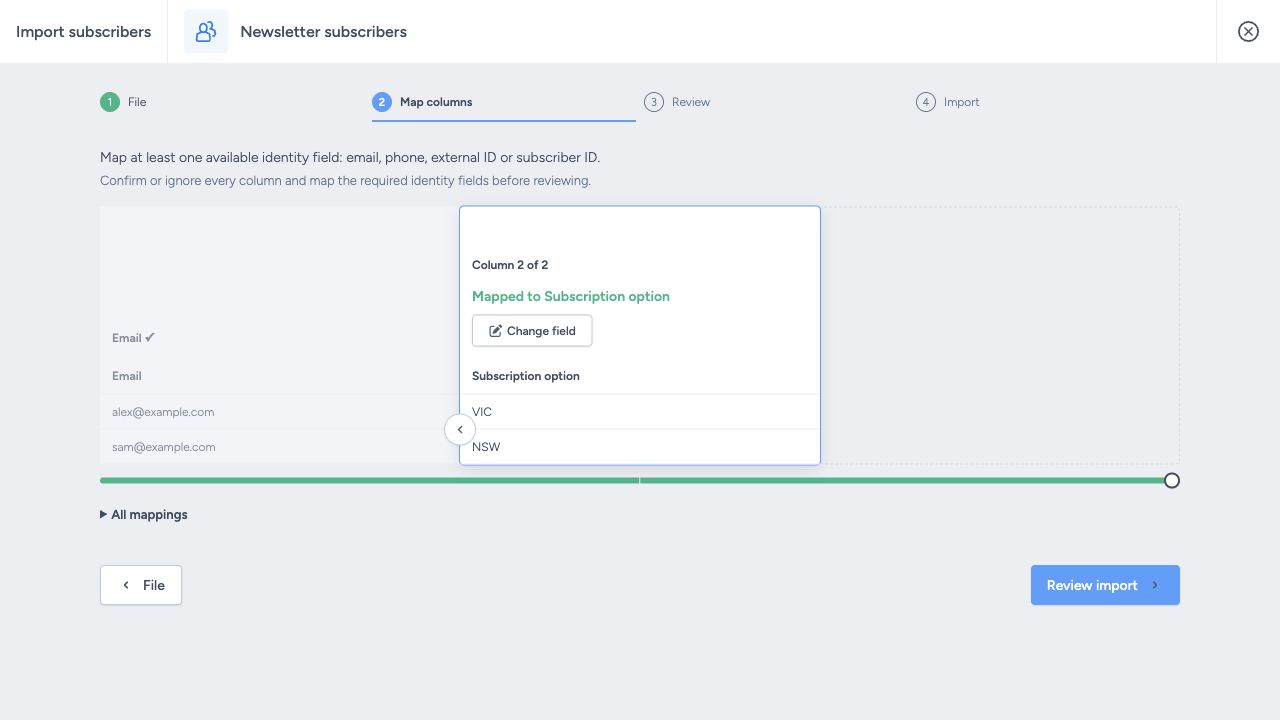
In this example, Alex's option will be VIC and Sam's will be NSW on the destination list. You can use your own text values; you do not need to create a predefined set of option names first. Any additional organisation import rules still apply.
Map and review
- Open the destination subscriber list's import and choose the file.
- Check the File preview and heading settings, then choose Map columns.
- Confirm an available subscriber identifier, such as Email.
- Map the option column to Subscription option (
list_option), then click Accept. Do not select a subscriber custom field. - Confirm or explicitly ignore every remaining column, then click Review import.
- Check the destination, mappings and issues before choosing Start import.
What changes?
Each subscriber has one Subscription option text value for each list membership:
- New value: replaces the existing text. If Alex has NSW and you import VIC, the saved value becomes VIC; the two values are not combined.
- Blank mapped cell: clears the existing text.
- Omitted or ignored column: preserves the existing option while you update other details.
After importing, check the list membership on a sample subscriber profile. The imported value can be used for targeting and personalisation.
Troubleshooting
| Issue | Check |
|---|---|
| Option did not change | Confirm the destination list and that the column maps to Subscription option rather than a custom field. |
| Row failed validation | Read the Review reason and check configured import rules; the importer does not require a match against predefined option names. |
| Existing text disappeared | Check whether the mapped source cell was blank. |