- Support Home
- Knowledge Base
- Target Expressions
- Audience Use Cases
Audience Use Cases
Taguchi offers two key tools for subscriber segmentation: Subscriber Lists and Audiences. Lists suit subscriber-managed preferences, while audiences enable data-driven targeting.
Using lists for subscriber-managed preferences
Subscriber Lists are ideal when subscribers control their membership. They manage opt-in/opt-out status and capture preferences during signup or via preference centres.
1. Identifying customers who have opted in to receive marketing
Use a list to store subscribers who have explicitly opted in to receive marketing communications, typically via signup forms or website checkboxes.
- Setup: Create a list such as
Marketing Opt-In - Form Submission Integration: Set up Form Submission to add subscribers to this list
- Target: Target using ‘subscribed list x’
2. Giving customers a choice of communication channels
Allow subscribers to manage their preferred channels (e.g., email, SMS, push notifications) using separate lists.
- Setup: Create distinct lists such as
Email Opt-In,SMS Opt-In, andPush Opt-In - Usage: Add or remove subscribers based on preferences via preference centre or API
- Targeting: Combine lists in your target expressions as needed, for example:
subscribed list (Email Opt-In) and not subscribed list (SMS Opt-Out)
3. Allowing customers to sign up for specific deals
Give subscribers options to sign up for targeted deals or topics of interest.
- Setup: Create a list for each topic, e.g.,
Weekly Specials,Holiday Deals,Member-Only Offers - Targeting: Use list membership to include or exclude relevant subscribers in campaigns
- Benefits: Enables customer-driven personalisation without complex target expressions
Using audiences for data-driven segmentation
Audiences dynamically group subscribers based on their behaviour, attributes, or calculated criteria. They are maintained by applying target expressions and are updated daily by the system.
1. Identifying customers at risk of disengaging
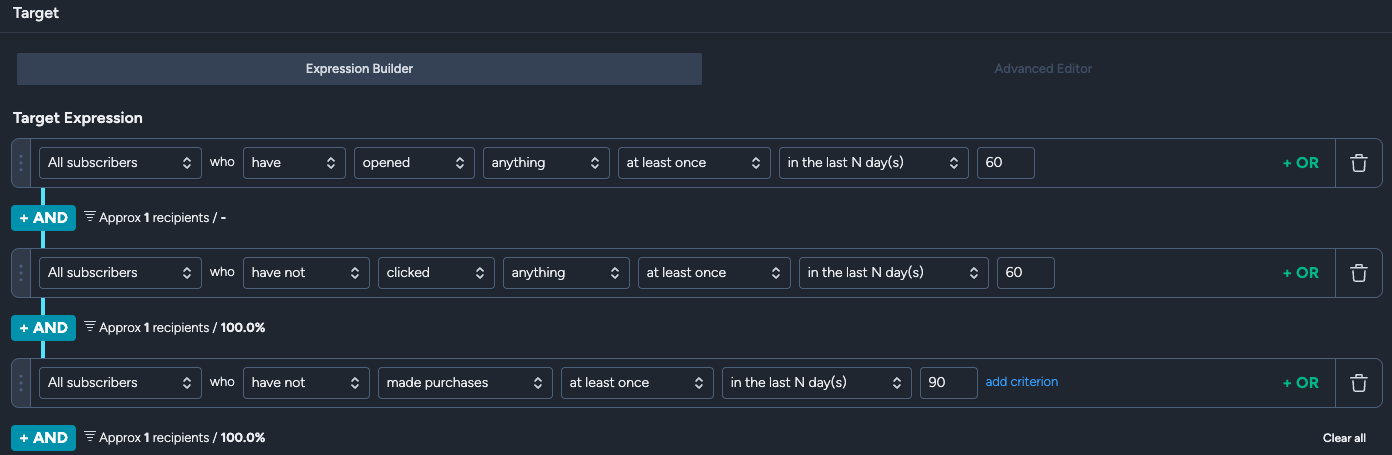
Target subscribers who haven’t opened or clicked in recent campaigns or haven’t purchased in a defined period.
- Audience name:
At Risk of Disengaging - Usage: Use this audience to trigger re-engagement campaigns
- Target expression example:
(opened any last 60 days and not clicked any last 60 days and not purchased last 90 days)
2. Grouping customers by loyalty program tiers
Segment your database based on loyalty level (e.g., Bronze, Silver, Gold) from a custom field.
- Audience name:
Gold Tier Customers - Usage: Personalise rewards and promotions by tier
- Target expression example:
'cf:loyalty_tier' = "Gold"

3. Tracking customers whose spend is trending up or down
Compare customer spend over two time windows to identify behavioural changes.
- Audience name:
High Spenders - Usage: Target them with upsell opportunities
- Target expression example:
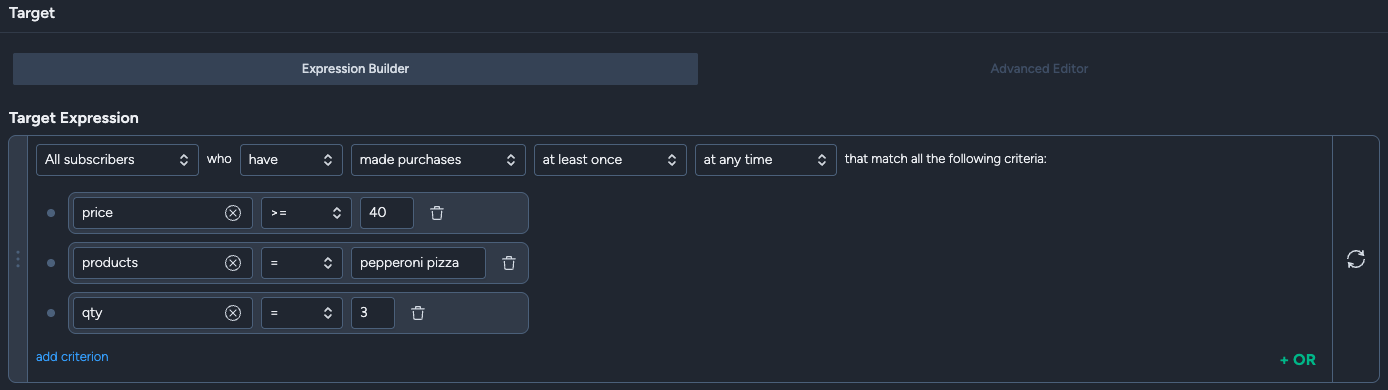
purchased price >= "40", products = "pepperoni pizza", qty = "3"
4. Targeting by engagement channel
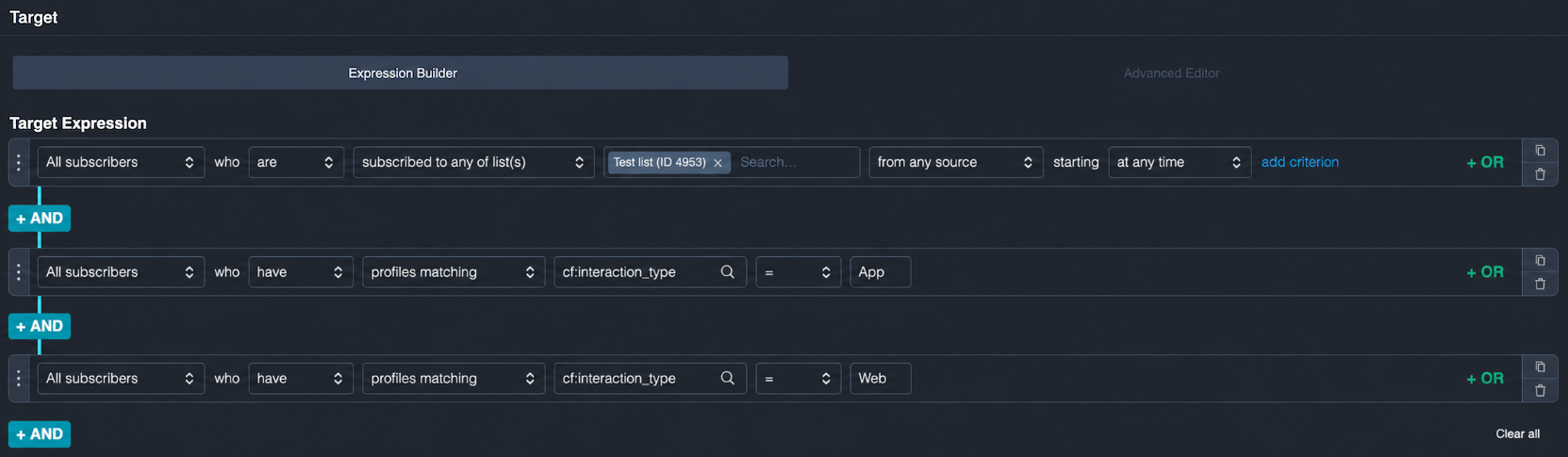
Group subscribers by whether they primarily interact via website or app.
- Target expression example:
- Usage: Optimise messages based on the channel they prefer
- Audience name:
Web and App Customers
('cf:interaction_type' = "App" and 'cf:interaction_type' = "Web") and subscribed list x
Other examples:
Example 1:
(visited url ilike "https://example.com/%" last 12 weeks count>=2 and not sent activities x last 6 weeks and not entered campaigns y last 6 weeks and not entered campaigns z last 6 weeks)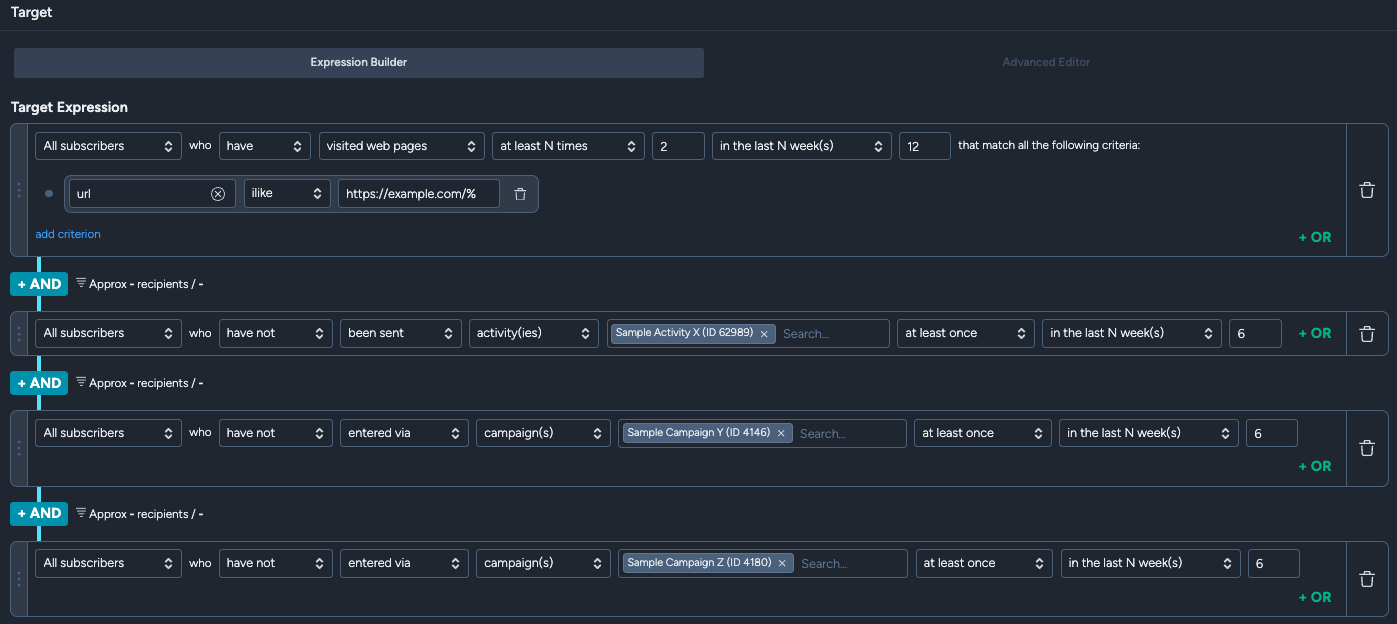
Example 2:
(subscribed lists x and contactable via email and 'cf:LAST_TREATMENT_CATEGORY_NAME' = "MASSAGES" and 'cf:SF_LAST_TREATMENT_NAME' = "South Melbourne" and 'cf:SF_LAST_TREATMENT_NAME' = "Organic Massage, Rest Massage" and purchased products @@ "$[*]?(@.type == \"Product\").size() > 0" last 2 days)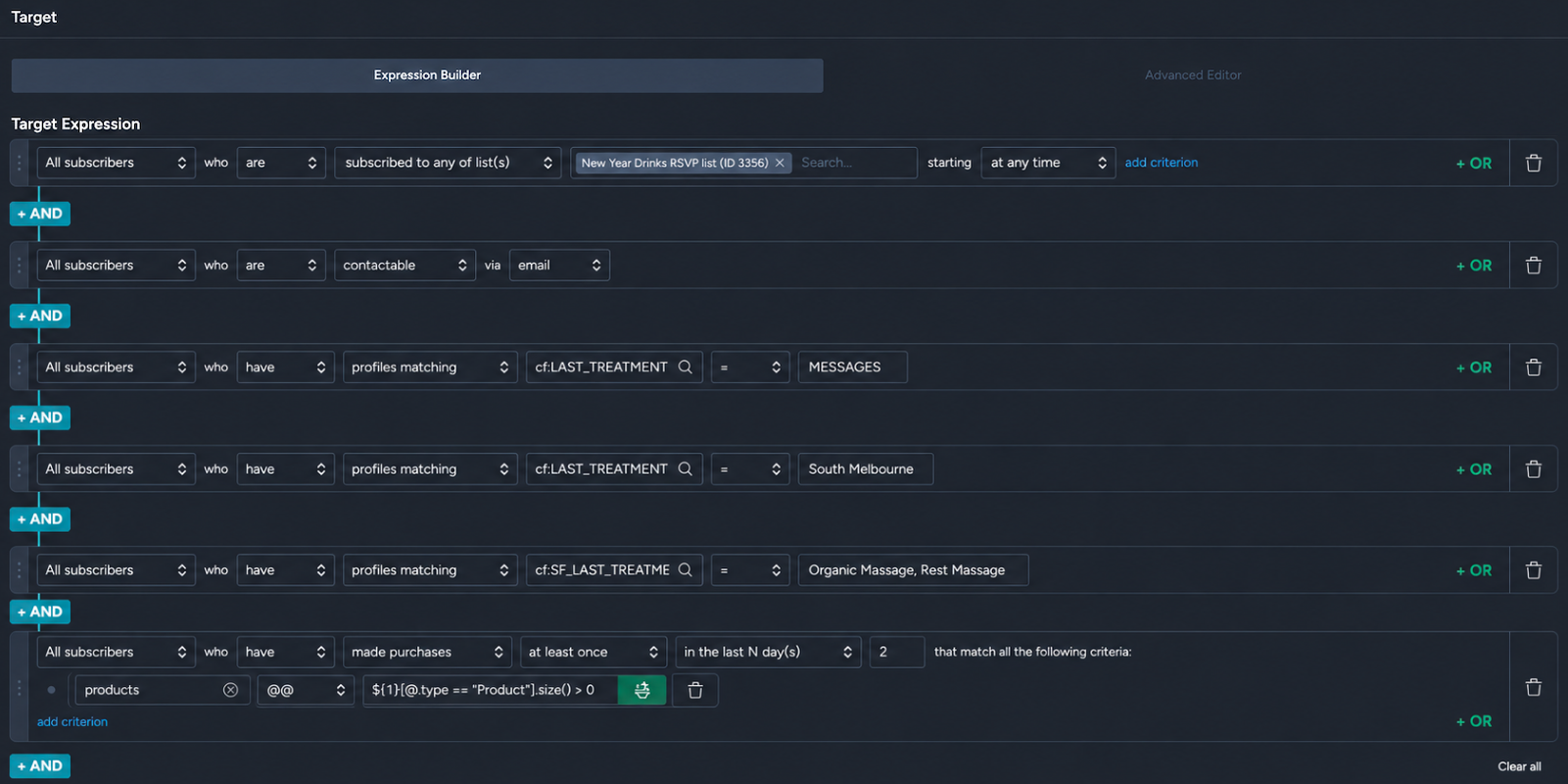
Example 3:
(subscribed lists i and not 'cf:Most Frequented Spa' one of "a, b, c" and ('cf:store_website_name' one of "Main Website" or not 'cf:store_website_name' != "null") and (opened activities t or clicked activities u or opened activities v) and ('cf:abandon_cart_data' like "{%}" and 'cf:abandon_cart_timestamp' is last 4 days and not purchased last month))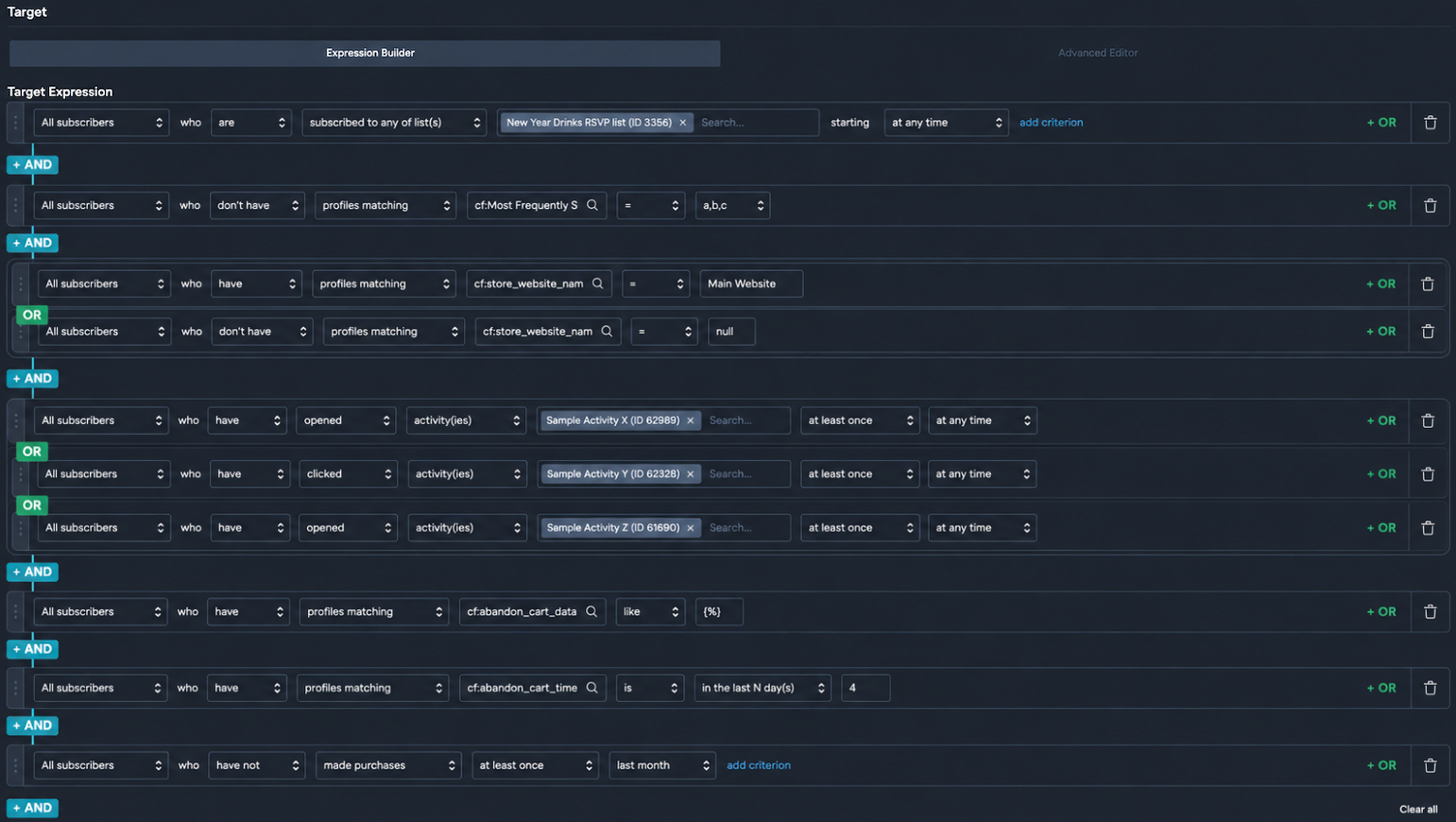
Summary
| Use Case | Use Lists | Use Audiences |
|---|---|---|
| Subscriber-controlled preferences | ✅ | ❌ |
| Opt-in tracking and compliance | ✅ | ❌ |
| Behavioural segmentation | ❌ | ✅ |
| Loyalty-based targeting | ❌ | ✅ |
| Spend trend analysis | ❌ | ✅ |
| Preferred engagement channel | ❌ | ✅ |
- Use lists when the subscriber is choosing their preferences.
- Use audiences when you are targeting based on behaviour, profile data, or calculated trends.
Need help designing your audience strategy? Reach out to your Account manager or Taguchi Support!